
After waiting 15 days, my new G90 finally delivered. I’ve been using it for a week, and what an interesting week it has been.
I have a lot to write about. I’ve had lots of successes, and a few failures, and I’ve learned a lot in just a week. I’ll have to break it down to some smaller blog entries to keep this from becoming a novel.
My first antenna was a 10m dipole. It was a simple antenna, made from a banana connector and about 8ish feet of wire coming off each connector. I strung it up in the tree’s in front of my house, and started going about the business of learning how to use my radio.
I’ll write more about my voice comms experience later… once I’ve logged a few… but for now, I’ll just say I have had zero HF voice contacts. Initially, I wasn’t sure what was wrong. I heard folks from all over the world, but I wasn’t even sure whether my radio was transmitting or not, so I detoured from voice comms to digital, just to see if everything was working or not. I figured setting up digital would be quick and easy, and I would know pretty quick whether the radio worked. It was NOT what I would consider quick, nor easy to set up. Not impossible, but not easy either.
I never got a digirig for my dual band radio, so this was my first foray into digital. There’s quite a learning curve to setting up a computer to operate a radio. There’s SO many combinations of computers, radio’s, and digital interfaces that I had trouble finding a web page, or video that explained exactly how to set my own up. I watched a lot of different videos to collect all the necessary information I needed. Just so you know, my G90 came with OS version 1.81 already installed. This matters, because some of the menus have changed, and most of the videos I watched were demonstrating on older versions. Software versions matter too. Just because you see a setting on a video doesn’t mean that setting is still in the same place! My laptop has Windows 10, and the digital interface that I have is a Xiegu DE19 that came as a bundle with the G90. I had to download and install the WSJT-X software, and a program called FLRig, which is the program that actually controls the radio (also called CAT controls). Getting 2 pieces of hardware to communicate through 2 different pieces of software was a challenge, but I finally got it figured out.
Getting the computer and radio to simply acknowledge each other was one thing… getting everything fine tuned so that they heard and understood each other was a different story. Getting the volume in and out, and the transmit power level set, and knowing when to turn on the pre-amp vs the attenuator, vs leaving them both off, and remembering to leave the voice compression off was all very tricky!!! Oh yeah, don’t forget to tune the antenna! Plus, the bands don’t always work during certain times of the day. There’s a lot of things that have to come into alignment for messages to start popping up on the screen. I’m amazed at the first person to figure this all out.
Eventually though, after several hours of tinkering, videos, and frustration, a message popped up on my screen. I didn’t know what to do with it, but it was there. Then a few more popped up. Now I had to figure out how to answer, so back to YouTube University. I did get it figured out, and my very first HF contact was a 20m FT8 into Maine, a little over 1000 miles away. At least now I knew that my radio did work, and my antenna, whether it is properly tuned or not, worked also.
The next day I went to the auto parts store and got a new roll of wire, and rebuilt my antenna into a 20m dipole. Same set-up, except the wire is about 16’7″ off each side, and this time I added some wire support to the middle to keep the strain off the connectors. I’ll write more about my physical antenna set up later. Also, I noticed that 9 of the 11 contacts that I made were all in New England. Not being sure how directional a di-pole is, I rotated the whole arrangement about 60 degrees. This is the antenna I’ve been using for almost a week.
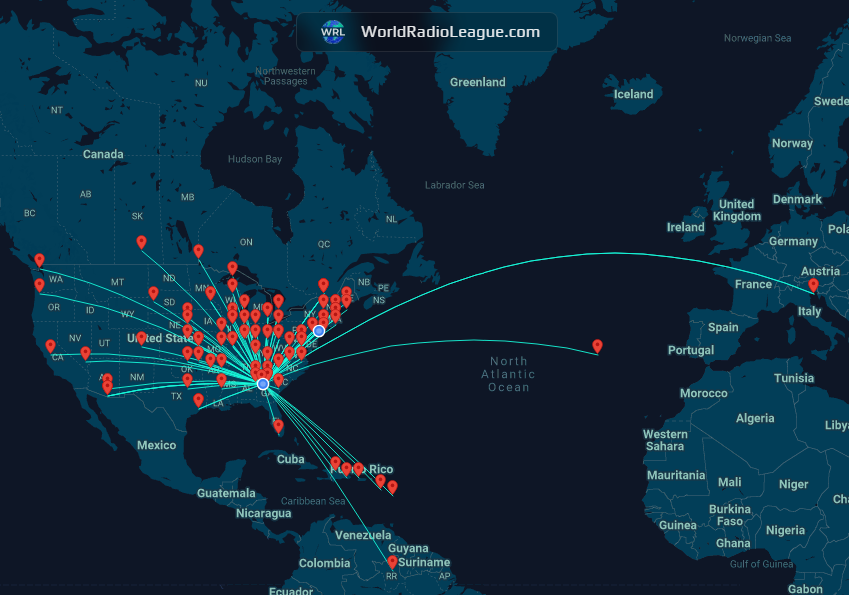
In the last week I’ve made about 100 confirmed contacts. If you’re new to FT4/8, there’s a series of message exchanges that occur to be considered an actual contact, and it’s all automated by your computer. I’ve made contacts on all the HF bands except 60 and 160 meters. This means I’ve had contact on 10, 12, 15, 20, 30, 40, and 80 meters, and I’ve made contacts in 8 different countries. All of this was on the 20m wire dipole. World Radio League lets you see your contacts on a map, and you can see mine below.
After several days of making FT4/8 contacts, I moved on to WinLink. This too required a lot figuring to get things working. Again, I had to get 2 different programs to talk to each other. FLRig apparently wasn’t a WinLink compatible controller for my radio, so this time I had to download VaraHF (not to be confused with VaraFM, which I did), as well as the WinLink Express program. WinLink e-mail is neat, but it is very time consuming, and finicky. Many times my system would connect to a gateway, then get kicked off for too high of a signal/noise ratio. I’m sure some of the problems I have are related to my antenna, but it took me about 20 minutes (once the program found a suitable gateway) to upload a 2 sentence e-mail. I’m still using the free version of both programs, but apparently things get a little faster once you’ve paid for them. I sent 2 e-mails and received 1, and that’s all I’ll do for now. There’s too much time spent waiting on the computer to work for this to be enjoyable. I do recognize how valuable it could be during a zombie apocalypse.
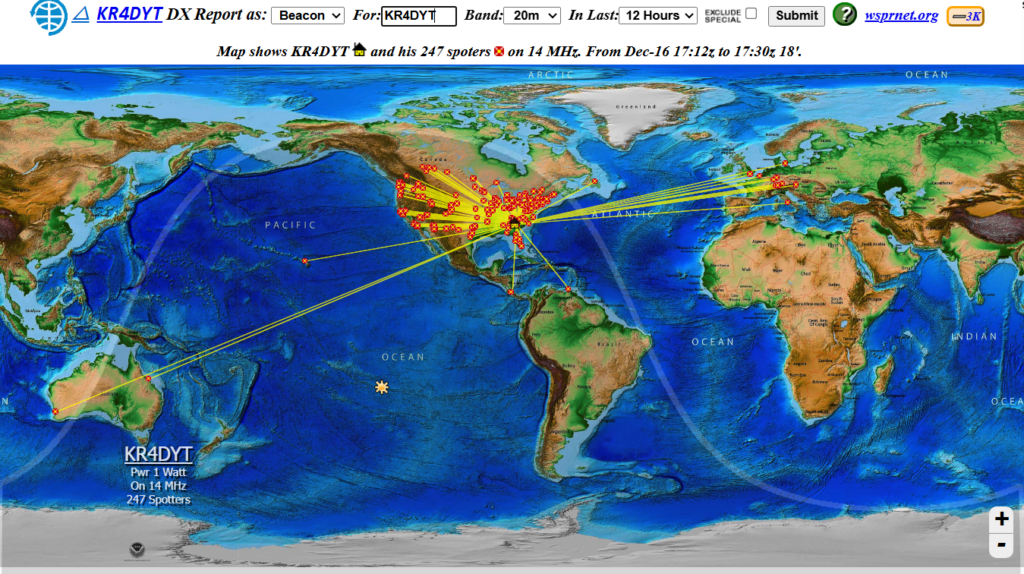
And to wrap things up, just today I discovered WSPR net. I was aware of its existence, but didn’t realize it was already built in to the WSJT-X program. I joined the WSPR website, and turned it on, just to see how far my signal carries. I forgot to turn down my power during my first transmission, and collected about 200 sites from all over the world. The whole purpose of WSPR is to see how far your signal carries on the least amount of power. Other folks hear your computer, and report back to the website that it heard you. I believe this might be the most valuable tool I’ve found so far, since it will allow me to see how far my signal is carrying. It’s one thing to see a single distant contact via FT8, but its a whole other thing to see 30 pop up all at once on a map from a single transmission. I’ll be able to learn more about day vs night propagation, as well as which bands are carrying during those times. The WSPR website just shows you a list, but there’s a super cool website that puts it all on a map. You can look at specific bands, and there’s some time control. I put a link in my ‘Handy Links’ page. You can see all of my 20m beacon contacts from today below.
While I still haven’t made any voice contacts, I’ve been very busy learning my radio, and experimenting with different things. I haven’t made many changes to my antenna yet. That’s next. I have to either purchase or build a balun to move to some vertical antenna setups. I still don’t know which antenna I want to start with. Comment if you have any experience with wire antennas and what works best for you.
Thanks for following along, and 73 y’all!