
Fair warning…. like so many other blogs, this post contains some affiliate links. I don’t post to make money… I would include links to products I like whether I get anything back or not, but I figure if I can make a few cents, or get a free month, then why not?
I recently signed up for Starlink service, and so far it’s been great! Being a ham, I love all things wireless, so this really appeals to me.
To give you an idea of the type of area where I live, and what my personal needs are, I’m in a neighborhood, but it’s in a rural area. This neighborhood was built before cable was popular, so it is not served by anyone for cable or internet, except for AT&T. Our options have been limited until recently to AT&T DSL or some old, slow satellite services. I don’t have any first hand experience with the satellite companies, but I’ve never heard anything good about them. They have a reputation for being very expensive, and slow. As for DSL, I did upgrade to Uverse a few years ago. It was faster than DSL, but it was a hybrid system and wasn’t fiber all the way to the house. I didn’t need much speed, so I opted for the lowest tier, which was 5 Mbps. This was enough to watch TV, and maybe some light internet surfing at the same time. Since it’s just my wife and I, and a 13 year old, who isn’t playing video games online, our needs are pretty light. The last year or so, we would frequently encounter a lot of buffering, which required someone to get off their device so someone else could do something. This usually happened because someone was playing a game on a phone or tablet.
Eventually our EMC started offering internet. I was excited at being able to have options, however, once it was finally installed in our area, and I checked the pricing, I decided to stay with AT&T. What I had was just enough for my needs, and at the time, the EMC service was pretty pricey. I believe the pricing was over double what I was already paying. Granted, this was for 1 gig speed, but that was a lot of speed that I was never going to use, so what was the point? The pricing, along with frequent outages (I guess there was a lot of bugs to work out) just didn’t make sense. My current service was adequate, and stable. As a side note, I went to check the pricing before writing this, and can’t get it unless I fill out a bunch of information. Shouldn’t this just be straightforward??? I don’t make it a habit of doing business with companies that collect information prior to giving me the info I want.
I had been paying attention to Starlink for the last few years, but it was still a new thing that wasn’t proven yet, and they charged a pretty big up front cost for the equipment, so I wasn’t interested. About 4 months ago I ran across a deal. Starlink was offering free equipment rental, 2 free months of free service, and 100 Mbps for $50 per month. That price has already increased to $55, but that is the same price that I was paying for my existing internet service. So, I could increase my speed by 20x for the same price? Since we were frequently hitting our bandwidth limits, suddenly I was interested!
Since they offered 2 free months, I had nothing to lose and decided to pull the trigger and try it out. If I didn’t like it, I would just send it back. I was surprised at how easy setup was. Their app walks you through each step. I literally, plugged everything in, put the receiver on my patio table (where it had a view of the sky), rotated it until the alignment box on the app said it was oriented in the correct direction, and waited a few minutes for it to start working. The included kick stand keeps it at the correct “tilt”. If you’ve ever set up a TV satellite dish, you should know that this is a thousand times easier!
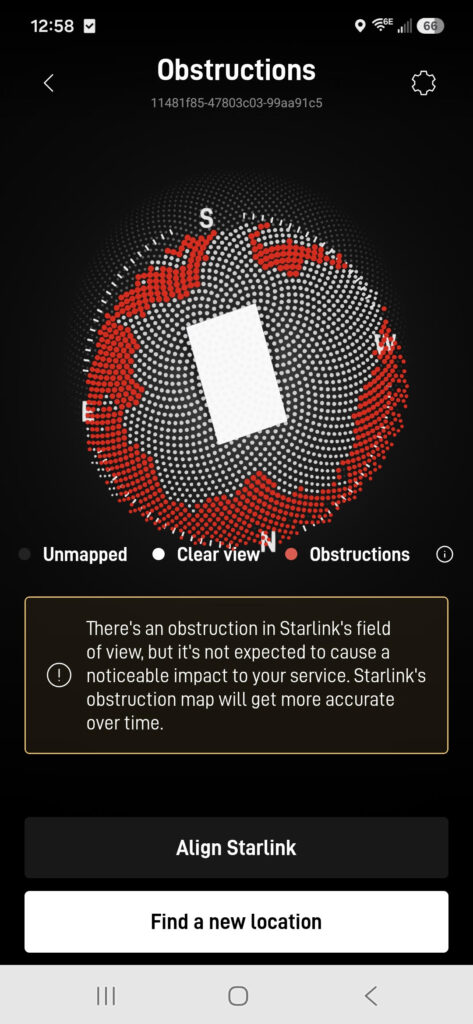
This is a screen shot of the obstructions on my Starlink app. You do need a clear view of the sky, and the better your view, the better your service will be. I have a clear view directly above my house, but I have a lot of trees around my house, so it is not perfect. After a day or 2, the app lets you know how obstructed your view is. Even with the obstructions, I consistently get good speeds. The only time I’ve had any buffering issues is once, during a heavy thunderstorm, and it was only 2 or 3 times for a few second each. Starlink does warn in the fine print that during heavy usage times, you might be throttled back due to the number of people using the service at the same time. It takes about 24 hours for Starlink to get settled in, figure out where it’s at, and where the satellites are at. It’s sort of like waiting for a GPS to find all of it’s satellites, except Starlink has about 10,000 constantly rotating the earth!
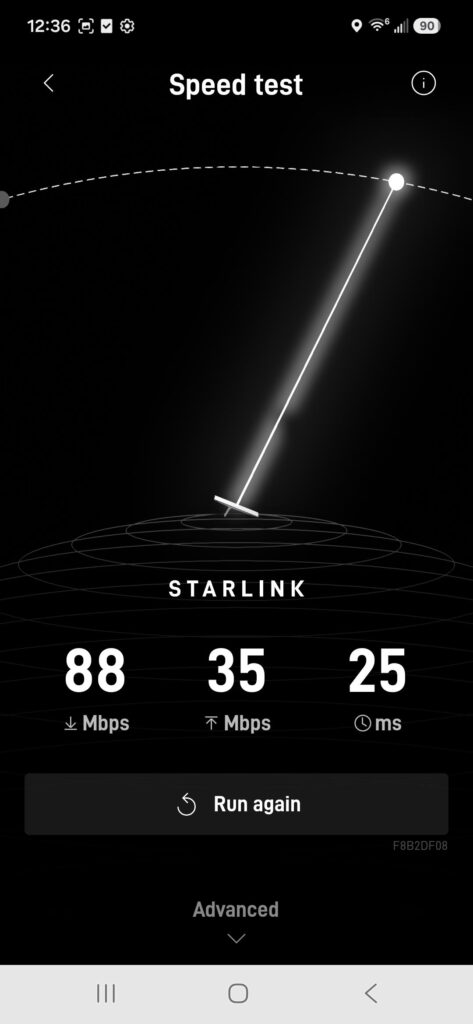
As for speeds, I don’t run speed tests constantly, but they do fluctuate. One second, I might get 30 Mbps, the next I might get 100, I think this just depends on what satellite it’s receiving from, and the angle at that moment. My obstructions, along with usage during different times of the day means every time I run a test I get a slightly different result. What I CAN say is that it is consistently better than my AT&T service. I ran a stress test one day by running video on all 4 of my Roku televisions, 3 computers, 2 tablets and 2 phones all at the same time. Not a single one buffered, or had any issues.
Last week, after mounting my 2M antenna to my house, I also mounted my Starlink receiver to the house. I had a J-pole from an old DirecTV satellite dish, so my plan was to mount it using this adapter (https://amzn.to/4v6SOnb). I also ordered a 100 ft cable (https://amzn.to/4v6SOnb), so that I would have plenty of length to route the cable. The mount is made from aluminum, and has 6 set screws to attach it to multiple size poles. It has the correct tilt, so all you have to do is attach it to a vertical mast, then rotate it until it’s oriented the right direction. This would have been perfect, had my roof not been so steep. If I had mounted it at the top of my roof (where my 2 meter antenna is), it would have worked just fine, but my ham antenna is mounted there, so I opted to mount it at the corner, and the old J-pole simply wasn’t tall enough for everything to clear my roof.
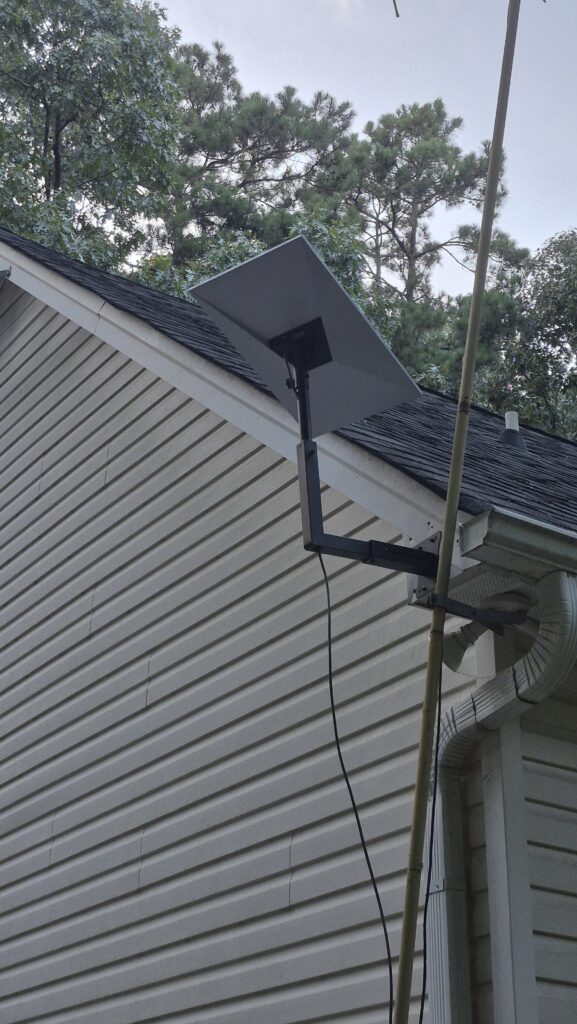
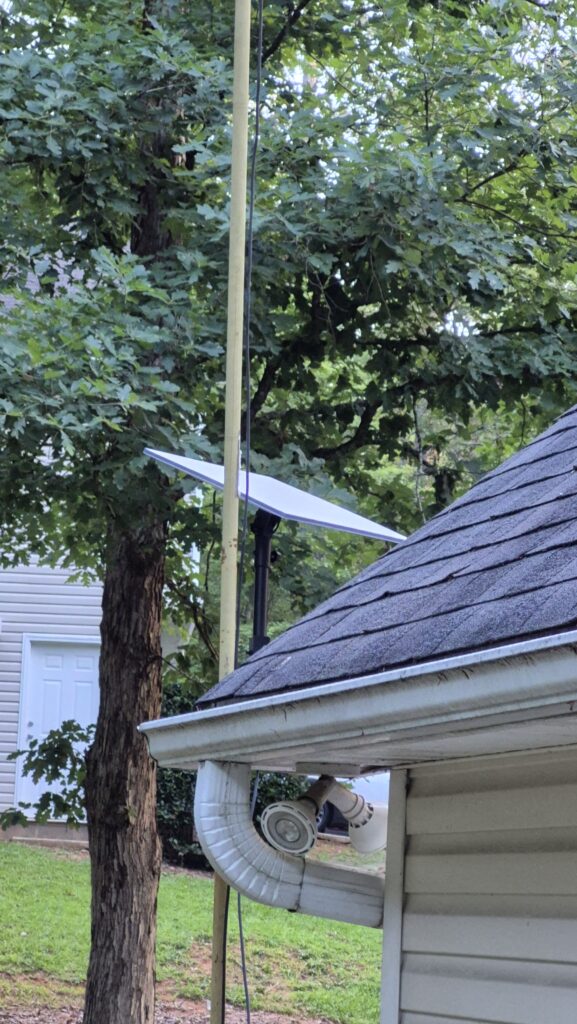
Instead, I had to get a mount that would either get the receiver away from my house, or higher. This one (https://amzn.to/4wveuuA) does both. The arm extends away from the base, and also extends higher. In these pics, it is extended, and raised to it’s max. It worked perfectly. I initially wondered if it would be sturdy enough, but once everything was tightened down, it seems pretty solid. I’ll have some thunderstorms roll through that will eventually test how sturdy it really is. Now all I have to do is pull the cable through my attic and route it where I want it.
To be clear, I am not a gamer. I do not have any need for crazy fast up and down speeds. It’s up to you to determine what suits your needs. Really, my highest demand is possibly running 3 televisions at the same time, and so far it has worked just fine. I’ll be retired in a few years, and if the service continues to be as good as it is now, there is no doubt that I will be ordering a Starlink mini to add to my camper.
If you’re interested, I would encourage you to use this referral link. It doesn’t hurt to use it, as a matter of fact, it gets you a free month of service, as well as me. https://starlink.com/residential?referral=RC-DF-11439117-32521-86
73 y’all!